
TokenAud Withdrawals · Australia · A$50 Minimum · 18+
TokenAud Withdrawal Rules: A$50 Minimum, the 100× Platform Cap and Three Cashout Routes
Withdraw through PayID, Bank Account or Crypto Wallet from A$50. TokenAud displays a 24-hour Withdrawal Time and an up-to-100× platform cap; link your cashout destination and clear the Remaining turnover shown on your account before submitting.
Decision Summary
TokenAud Withdrawal at a Glance
Use this table to separate fixed withdrawal rules, platform-displayed fields and your live account status before choosing a route and entering an amount.
| Field | What it says | Type of fact |
|---|---|---|
| Minimum withdrawal | A$50 per request | Confirmed rule |
| Platform maximum | Up to 100× your deposit amount | Platform-displayed rule |
| Withdrawal time | 24 hours, shown on the panel as Withdrawal Time | Platform-displayed field |
| Routes | PayID, Bank Account, Crypto Wallet | Confirmed panel tabs |
| Destination requirement | A withdrawal destination must be registered under Account Management before a route can be used | Confirmed flow |
| Turnover gate | Withdrawal turnover requirements are listed with a Game type and a Remaining turnover figure; the panel states the required turnover must be completed for withdrawal | Account-specific, changes with your activity |
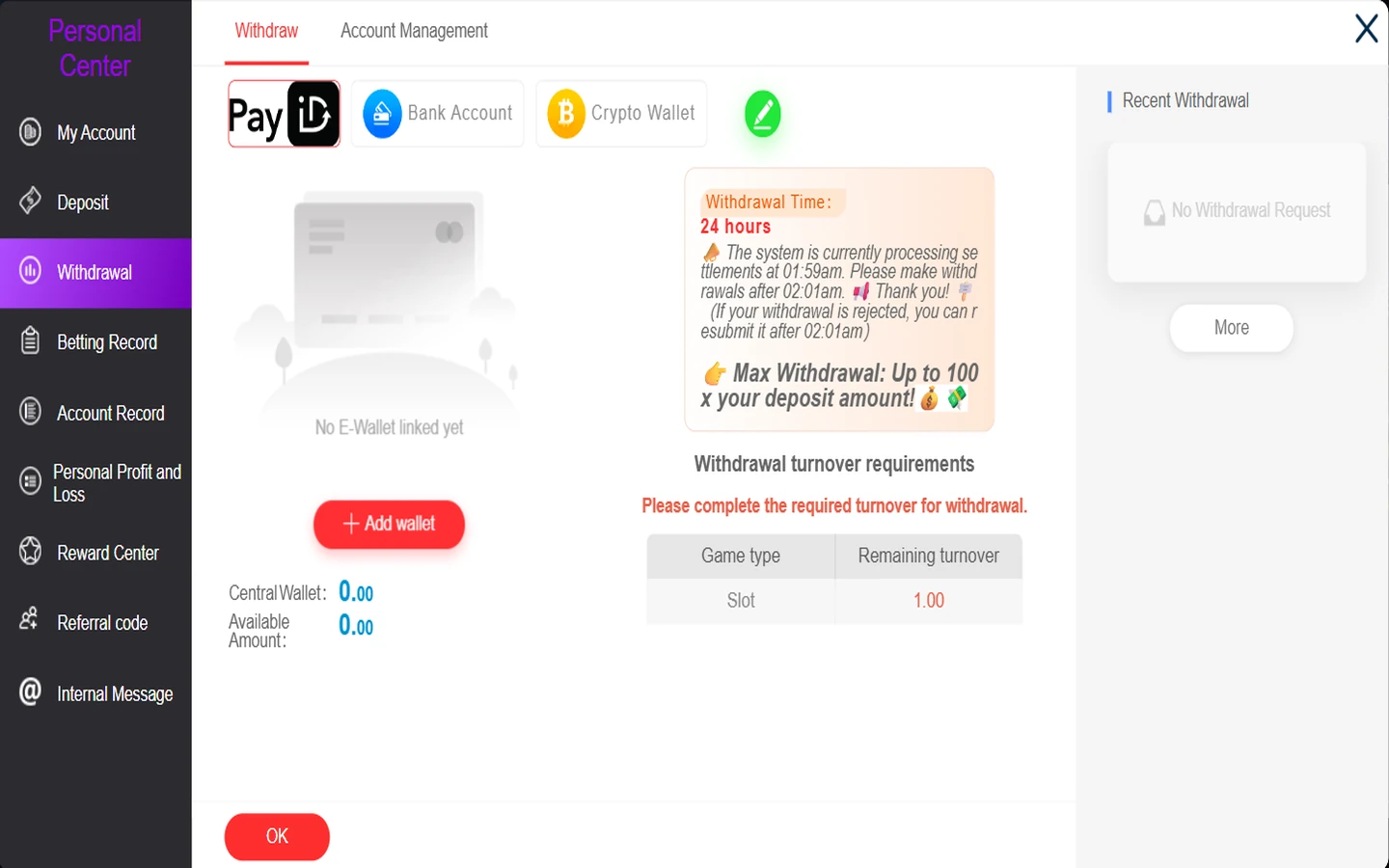
| Settlement notice | Settlements process at 01:59 AM; the panel asks members to make withdrawals after 02:01 AM, and says a rejected withdrawal can be resubmitted after 02:01 AM | Platform-displayed notice |
| Balance fields | Central Wallet and Available Amount are shown beside the route tabs | Account-specific |
| Request history | Recent Withdrawal, with a No Withdrawal Request empty state and a More control | Account-specific |
| Where it happens | Personal Center → Withdrawal on tokenaud.com | Confirmed path |
On a narrow screen the table scrolls sideways. Offer-specific withdrawal caps are separate again and are held in the TokenAud bonus terms.
Platform Cap
Calculate the 100× Platform Cap
The panel states a maximum withdrawal of up to 100× your deposit amount. That is a ceiling on what the platform rule allows, not a payout, a bonus multiplier or an expected return. Enter a deposit figure to see the ceiling it produces.
Confirmed example: an A$50 deposit. A$50 × 100 gives a platform cap illustration of A$5,000. Select Calculate the 100× Platform Cap to run your own figure.
This is a platform-cap illustration, not a guaranteed withdrawable amount. The panel does not state which deposit the multiplier is applied to, so treat the result as the ceiling the rule describes rather than a figure you can request. What you can actually withdraw is set by the hierarchy below and by your live panel. The calculation runs on your own device and nothing is saved or sent.
The six levels that decide a withdrawal
- A$50 minimum request threshold. Below this figure a request cannot be made at all.
- Available Amount. The panel shows this beside the route tabs; it is the balance the account currently treats as withdrawable.
- Remaining turnover. The panel lists Withdrawal turnover requirements and states the required turnover must be completed for withdrawal. Until it is, the request is gated regardless of balance.
- Platform maximum of up to 100× the deposit amount. The ceiling described by the platform rule.
- Offer-specific withdrawal cap. A promotion can set a lower ceiling than the platform rule, and where it does, the lower figure governs that reward — see the offer withdrawal caps in bonus terms.
- Linked destination and live panel state. No route works until a destination is registered, and the panel is the final authority on what can be submitted right now.
Route Comparison
Compare TokenAud PayID, Bank Account and Crypto Wallet Withdrawals
The three routes sit under the same TokenAud withdrawal panel. The A$50 minimum, up-to-100× platform cap, 24-hour displayed time and Remaining turnover gate apply at panel level; the registered destination and required fields differ by route.
| Field | PayID | Bank Account | Crypto Wallet |
|---|---|---|---|
| Route label on the panel | PayID | Bank Account | Crypto Wallet |
| Registered destination type | E-wallet entry under Account Management | Bank account entry under Account Management | Crypto wallet entry under Account Management |
| Identifiers and fields | PayID account name, PayID Email or Phone Number, mobile number and verification code | Select Bank, Name on Card, Account Number | Wallet type and Wallet address |
| Registration status shown | Registered E-wallet (0/2), with a No E-Wallet linked yet empty state | Registered Withdrawal Accounts (0/1), with a No bank account linked yet empty state | Bound wallet (0/1), with an Empty wallet list state |
| Where to register | Personal Center → Withdrawal → Account Management | ||
| Status and history | Recent Withdrawal on the Withdraw tab, with a More control | ||
| Known unknowns | Arrival time and any fee are not published on the panel | Bank processing behaviour and any fee are not published on the panel | Network, confirmations, processing behaviour and any fee are not published on the panel |
Choose the route whose destination is already registered. If no destination is linked, register one under Account Management before entering the withdrawal amount.
Opens tokenaud.com; withdrawals are completed after login at Personal Center → Withdrawal.
Account Management
Link a TokenAud Withdrawal Destination Before Cashing Out
Before entering a first withdrawal, check whether the chosen destination is already registered. Account Management sits beside Withdraw and holds the E-wallet, Bank Account and Crypto Wallet registration routes.
E-wallet
Where PayID Email or Phone Number is selected and registered. The form displays PayID account name, mobile number and verification code fields, while the account side shows Registered E-wallet (0/2).
Bank Account
Select Bank, Name on Card and Account Number, then Submit. The panel shows Registered Withdrawal Accounts (0/1) and No bank account linked yet before registration.
Crypto Wallet
Select Wallet type, enter the Wallet address and submit. The panel shows Bound wallet (0/1) and an Empty wallet list before registration.
Register first, then return to Withdraw. The recorded interface displays Registered E-wallet (0/2), Registered Withdrawal Accounts (0/1) and Bound wallet (0/1). Check the current status on your live account, choose the destination you intend to use and enter every value on TokenAud.com. TokenAud.org does not collect account names, account numbers, PayID identifiers, wallet addresses or verification codes. Do not provide a password, one-time code or wallet seed phrase through any support message or information page.
Opens tokenaud.com; registration is at Personal Center → Withdrawal → Account Management.
Route One
TokenAud PayID Withdrawals
Identifiers: email or phone number
PayID appears on both sides of the account, and the identifier set is not the same. For withdrawals, PayID accepts an email address or a phone number. For deposits, the route shown in the cashier is PayID (Email) — the phone identifier is a withdrawal-side option only.
- Destination: registered as an E-wallet entry under Account Management.
- PayID type: choose PAYID (Email) or PAYID (Phone Number), then complete the PayID account-name and identifier fields displayed on the form.
- Registration check: the form displays mobile-number and verification-code fields, while the account list shows Registered E-wallet (0/2).
- Before registration: the Withdraw tab shows Add wallet with a No E-Wallet linked yet state.
- Minimum: A$50, the same as every other route.
- Not published on the panel: arrival time and any fee. The 24-hour figure is the platform's displayed Withdrawal Time field, not a route-specific arrival promise.
If a PayID route will not accept your entry, check that you are using the withdrawal identifier rather than a deposit-side value, then contact TokenAud withdrawal support with the time and route. Deposit-side detail is on the payment methods page.
Route Two
TokenAud Bank Account Withdrawals
Registration fields and the bank selector
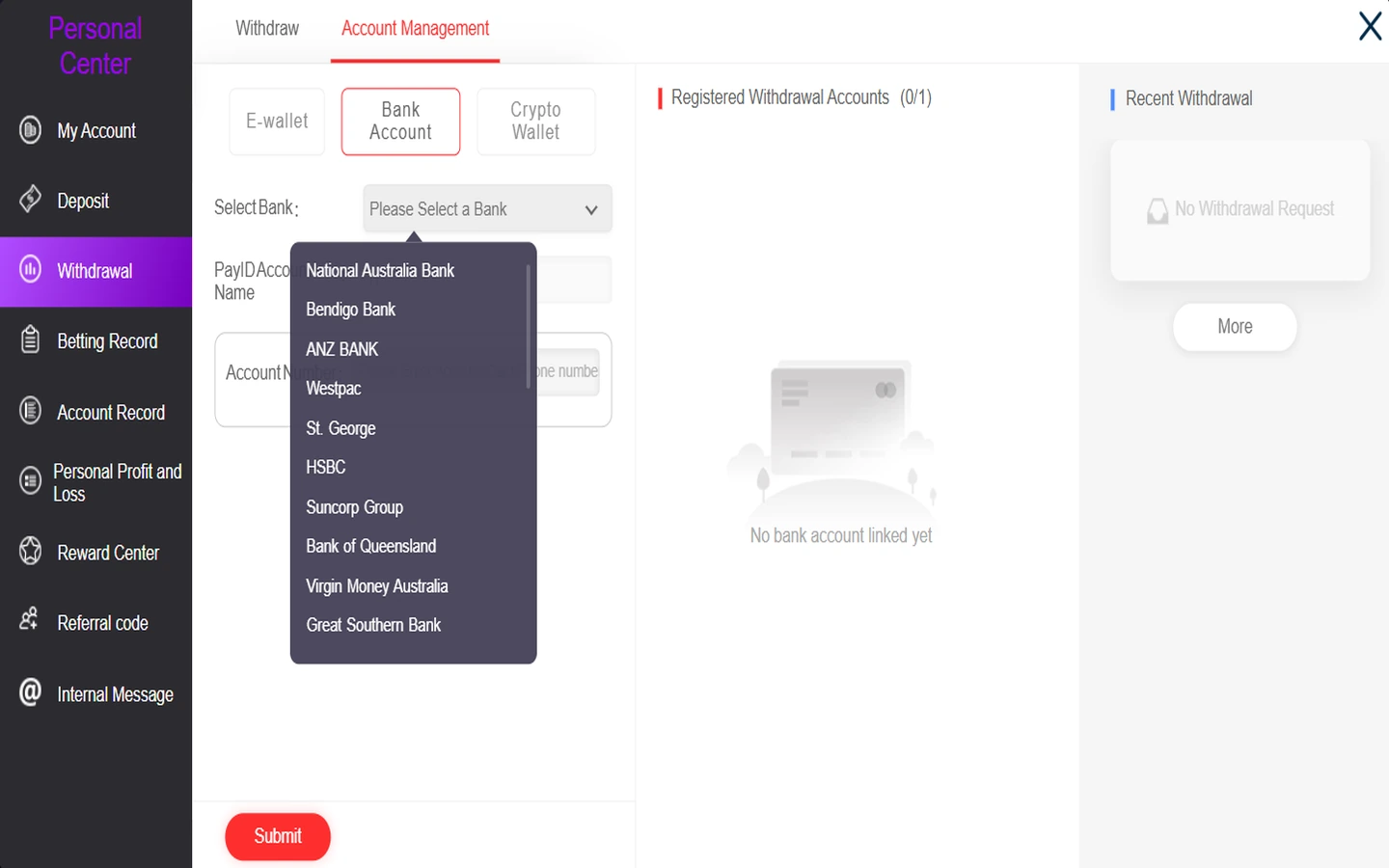
The bank route registers a destination from a fixed selector rather than free text. Account Management asks for Select Bank, Name on Card and Account Number, then Submit. Before a destination exists the panel shows Registered Withdrawal Accounts (0/1) and a No bank account linked yet state.
- Choose from the selector. The bank has to be one of the entries in the Select Bank list — a bank outside that list cannot be registered from this screen.
- Name on Card and Account Number are entered on the live panel. Never enter them anywhere else.
- Minimum: A$50, and the same turnover gate applies before the request can be made.
- Not published on the panel: bank processing behaviour, business-day rules and any fee.
Banks in the TokenAud Select Bank list (31 verified entries)
Read directly from the Select Bank dropdown at the last review, in the order the list displays them. The platform controls this list and it can change.
- National Australia Bank
- Bendigo Bank
- ANZ BANK
- Westpac
- St. George
- HSBC
- Suncorp Group
- Bank of Queensland
- Virgin Money Australia
- Great Southern Bank
- UP Bank
- Bankwest
- Commonwealth Bank
- Bank of Melbourne
- Defence Bank
- Hume Bank
- Macquarie Bank
- Greater Bank
- Newcastle Permanent
- Coastline Credit Union
- ANZ PLUS BANK
- Bank of Sydney
- Beyond Bank Australia
- HERITAGE BANK
- ING BANK AUSTRALIA
- ME Bank
- MeGo Bank
- MyState Bank
- People Choice
- REVOLUT
- UBANK
Names are reproduced exactly as the selector displays them, including its own capitalisation. Confirm the current list on the live panel before registering.
Route Three
TokenAud Crypto Wallet Withdrawals
Registration fields and what the panel decides
The crypto route binds a wallet before it can be used. Account Management asks for a Wallet type and Wallet address, then Submit. Before a wallet exists the panel shows Bound wallet (0/1) and an Empty wallet list.
- Wallet type is selected on the live panel. The withdrawal side does not publish a network list, so no coin or network is stated here.
- The deposit route does not decide the withdrawal route. USDT-TRC20 is confirmed as a deposit route on the payment methods page; that is a separate configuration and it should not be assumed to apply to a cashout.
- Not published on the panel: network, confirmations, processing behaviour and any fee.
- Never share a wallet seed phrase. Wallet binding uses an address; a recovery phrase is not required for this withdrawal destination and must not be entered or sent.
Read the wallet type and every destination field shown on the live panel when you bind the wallet. If no network is explicitly displayed, do not assume one from the deposit route; contact TokenAud withdrawal support before proceeding.
Execution Path
Withdrawing From TokenAud, Step by Step
Eight steps from account entry to a submitted request. Complete destination registration and the Remaining turnover check before entering the withdrawal amount.
Log in on TokenAud.com
Accounts live on the platform. New members start with the registration guide; if sign-in fails, use login help.
Open Personal Center → Withdrawal
The panel opens on the Withdraw tab with the three route tabs, the balance fields and the turnover requirements.
Open Account Management if nothing is linked
If the panel shows an empty state for your route, register the destination before going any further.
Register the destination on the live fields
Complete the E-wallet, Bank Account or Crypto Wallet form on the platform and submit it there.
Return to Withdraw and pick the route
Select the route whose destination you registered. The route tabs sit across the top of the Withdraw view.
Check Available Amount and Remaining turnover
Both are shown on the panel. If turnover is outstanding, the request is gated until it is completed.
Enter at least A$50 and follow the live form
The minimum applies to every route. Complete whatever fields the live withdrawal form presents for your chosen route.
Submit and check Recent Withdrawal
The record appears in the Recent Withdrawal area, with More for the fuller history. If it stays unresolved, contact TokenAud withdrawal support.

Destination linked, Remaining turnover cleared and route chosen — submit the cashout from A$50 in the TokenAud.com withdrawal panel.
Withdraw on TokenAud.comReadiness Check
Withdrawal Readiness Matrix
Eight conditions decide whether a request can be submitted right now. Check them in order to identify the active blocker before resubmitting.
| Condition | What it controls | Where to check |
|---|---|---|
| A$50 minimum | Whether a request can be made at all | Fixed rule — applies on every route |
| Available Amount | The balance the account treats as withdrawable | Withdraw tab, beside the route tabs |
| Remaining turnover | Whether the turnover gate is still open | Withdrawal turnover requirements on the panel |
| Platform 100× cap | The ceiling described by the platform rule | Max Withdrawal note on the panel |
| Offer-specific cap | A lower ceiling on a reward from a promotion | Bonus terms — withdrawal caps |
| Linked destination | Whether the chosen route can be used | Account Management registration state |
| Settlement window | Whether now is a good moment to submit | Panel notice: after 02:01 AM |
| Recent Withdrawal status | Whether a request already exists | Recent Withdrawal area, then More |
Turnover Gate
Turnover Before a Withdrawal
What the panel shows
The Withdraw tab carries a Withdrawal turnover requirements area and the instruction to complete the required turnover for withdrawal. It lists a Game type alongside a Remaining turnover figure, so the gate is visible before you attempt a request rather than after it fails.
Remaining turnover is an account-specific field. It reflects your own activity and any offers you have claimed, and it changes as you play. There is no single site-wide figure to quote — the number on your own panel is the one that applies.
Where the requirement comes from
Turnover requirements attach to the offers you claim rather than to the withdrawal panel itself. Each promotion states its own rollover basis and multiplier, which is why two accounts can show completely different remaining figures at the same balance.
The binding definitions sit with the offers: how TokenAud rollover is calculated explains the basis and multiplier, and the current promotions show which offers are live. If no promotion was selected, do not assume the Remaining turnover is zero; the live withdrawal panel is the account-level check.
Read your own figure, not an example. Any Remaining turnover value visible in a screenshot or guide belongs to the account it was captured from at that moment. Open your own panel before planning a cashout, and treat the offer's own conditions in bonus terms as the explanation of why the figure is what it is.
Timing
24 Hours and the Settlement Window Are Two Different Things
The panel displays two separate time facts, and they are frequently read as one. Neither is a promise about when funds arrive in a bank or wallet.
The panel's Withdrawal Time field. It is the figure the platform displays for withdrawals, published as a field rather than as a guarantee.
The notice states the system is processing settlements at this time.
The notice asks members to make withdrawals after this point, and says a rejected withdrawal can be resubmitted after this time.
How to use these two fields. Treat 24 hours as the platform's stated Withdrawal Time and follow the displayed settlement notice by submitting after 02:01 AM. Neither field describes bank clearing behaviour, crypto network confirmations, weekend handling or a time zone. If a request is rejected around the settlement period, the notice instructs members to resubmit after 02:01 AM.
Request Status
TokenAud Recent Withdrawal and Cashout Status
Where the record appears
Recent Withdrawal sits on the right of the Withdraw tab. It is the first place to confirm that a request was actually submitted.
The empty state
No Withdrawal Request means the panel holds no submitted request. If you expected one, the submission did not complete — check the amount, the destination and the turnover gate before resubmitting.
Fuller history
The More control opens the wider record. Use it to confirm the route, time and amount of an earlier request before contacting support.
If a request stays unresolved. Send the time, amount, route and a screenshot of the Recent Withdrawal entry to TokenAud withdrawal support. Crop out balances and account identifiers first. Never send a password, a one-time code, a full bank account number or a wallet seed phrase to anyone, on any channel, including anyone claiming to be support — confirm the channel first on the official domains page.
Diagnostics
TokenAud Withdrawal Not Going Through? Check These 12 Causes
Twelve checks in the order they usually apply, each with the specific next action.
The amount is below A$50
Next step: raise the request to at least A$50. The minimum applies on every route, and a smaller request cannot be submitted.
Available Amount is lower than the request
Next step: request no more than the Available Amount shown on the panel. That field, not the total balance, is what the account treats as withdrawable.
Remaining turnover is not complete
Next step: read the Remaining turnover figure on your own panel and complete it on the stated game type. The rollover explanation in bonus terms covers how the requirement was set.
No destination is linked
Next step: open Account Management and register the E-wallet, Bank Account or Crypto Wallet destination for the route you want, then return to Withdraw.
PayID email and phone confusion
Next step: for withdrawals PayID accepts an email or a phone number; the deposit route is PayID (Email) only. Use the withdrawal-side identifier here — deposit detail sits on payment methods.
Bank details incomplete or mismatched
Next step: reopen Account Management and complete Select Bank, Name on Card and Account Number exactly as the live fields require. The bank must be one of the selector entries.
Crypto wallet type or network is unclear
Next step: read the wallet type on the live binding form rather than assuming the deposit network applies. If the panel does not make it clear, ask support before binding.
The request landed in the settlement interval
Next step: wait until after 02:01 AM and submit again. The panel notice asks members to make withdrawals after that time.
A rejected request was not resubmitted
Next step: the notice states a rejected withdrawal can be resubmitted after 02:01 AM. Resubmit once through the panel rather than repeating the same request several times.
A promotion cap is lower than the platform cap
Next step: check the offer's own ceiling in bonus terms. Where an offer states a lower maximum, that figure governs the reward regardless of the 100× rule.
Recent Withdrawal shows nothing
Next step: the submission did not complete. Recheck the amount, destination and turnover gate, then submit again from the panel.
Still unresolved after all of the above
Next step: contact TokenAud withdrawal support with the time, amount, route and a cropped screenshot. Never share a password, one-time code, full account number or seed phrase.
Do not attempt to work around a gate by splitting a request into many small submissions, opening additional accounts or using someone else's destination. Those actions create account problems of their own and do not change the conditions on the panel.
Two Panels
Deposits and Withdrawals Are Configured Separately
The two sides of the cashier share brand names but not settings. Check the withdrawal panel itself instead of carrying a deposit identifier, amount or crypto configuration into a cashout request.
| Field | Deposit side | Withdrawal side — this page |
|---|---|---|
| PayID identifier | PayID (Email) | Email or phone number |
| Crypto configuration | USDT-TRC20 confirmed as a deposit route | Wallet type is selected on the live binding form; no withdrawal network list is published on the captured panel |
| Bank list | Not part of the deposit routes | Select Bank list used to register a bank destination |
| Minimum | Deposit minimums are held on the payment methods page | A$50 minimum withdrawal |
| Panel | Personal Center → Deposit | Personal Center → Withdrawal |
Deposit routes, amounts and the cashier path are owned by the TokenAud payment methods page.
Reward Format
How a Reward Was Obtained Does Not Remove Withdrawal Rules
Rewards reach an account in different ways — some are linked to a deposit, some are claimed in the App after verification, and some formats require no funding at all. That classification describes how the reward was acquired. It does not describe what happens at cashout.
Whatever the reward format, the withdrawal panel still checks the A$50 minimum, Available Amount, Remaining turnover, the platform cap and any lower ceiling attached to the offer. A reward obtained without a deposit is not automatically free of turnover, verification or a withdrawal cap.
The format comparison itself belongs elsewhere: the online pokies no deposit bonus guide covers how the formats differ and what each one means for wagering, while the conditions attached to a specific TokenAud offer sit in bonus terms.
Evidence
How These Withdrawal Facts Were Checked
- Page owner
- TokenAud.org, the official TokenAud brand website for Australia. This is a first-party withdrawal information page, not an independent review site, a payment provider or a legal adviser.
- Source basis
- The route tabs, the A$50 minimum, the up to 100× maximum note, the 24-hour Withdrawal Time field, the settlement notice, the withdrawal turnover requirements area, the Central Wallet and Available Amount labels, the Recent Withdrawal area and the Account Management registration fields were read from the TokenAud.com Withdrawal panel. The Select Bank list was read from the Account Management bank capture.
- Bank list verification
- 31 entries, read frame by frame from the Select Bank dropdown and reproduced in display order with the selector's own spelling and capitalisation. No name was added from memory or from any other source, and no unreadable entry was guessed.
- Last reviewed
- What is not claimed
- No completed withdrawal test is claimed. The platform publishes no fee schedule, no bank arrival time, no crypto network or confirmation count for withdrawals and no time zone for the settlement notice, so none is stated here. The 24-hour field is reproduced as a platform display, not as a guarantee, and the 100× rule is a cap rather than an expected return.
- Dynamic fields
- Available Amount, Remaining turnover, Recent Withdrawal and the registration slots are account-specific and change with your activity. Read them on your own panel; any figure shown in a capture belongs to the account it came from.
- Reporting a difference
- The live panel governs. If a value here differs from what you see, the panel applies — report the difference to TokenAud support so this page can be corrected.
FAQ
TokenAud Withdrawal Questions
What is the TokenAud minimum withdrawal?
A$50. The minimum applies on all three routes — PayID, Bank Account and Crypto Wallet — and a request below it cannot be submitted.
What does the 100× maximum actually mean?
The panel states a maximum withdrawal of up to 100× your deposit amount. It is a ceiling described by the platform rule, not a bonus multiplier, an expected return or a guaranteed payout. What you can withdraw is still set by your Available Amount, the turnover gate and any lower offer-specific cap.
How does the A$50 to A$5,000 example work?
An A$50 deposit multiplied by 100 gives an A$5,000 ceiling under the platform rule. It is an illustration of the cap calculation, not a promise that A$5,000 is available to withdraw.
What does the 24-hour withdrawal time mean?
It is the Withdrawal Time field the platform displays on the panel. It is published as a field rather than as a guarantee, and it does not describe bank clearing, crypto confirmations, weekends or a time zone — none of which is published.
Which withdrawal routes does TokenAud offer?
Three: PayID, Bank Account and Crypto Wallet. Each needs its own destination registered under Personal Center → Withdrawal → Account Management before it can be used.
Is the PayID withdrawal email or phone?
Either. PayID withdrawals accept an email address or a phone number. The deposit side is different — the deposit route shown in the cashier is PayID (Email), covered on payment methods.
How do I register a bank account for withdrawals?
Open Account Management, choose the Bank Account tab, then complete Select Bank, Name on Card and Account Number and submit. The bank must be one of the 31 entries in the Select Bank list, shown above. Before registration the panel displays Registered Withdrawal Accounts (0/1).
Which crypto network is used for withdrawals?
The withdrawal panel does not publish a network list, so none is stated here. Read the wallet type on the live binding form. The USDT-TRC20 route confirmed on the deposit side is a separate configuration and should not be assumed to apply to a cashout.
What is Remaining turnover and where do I check it?
It is the outstanding turnover shown in the Withdrawal turnover requirements area of your own panel, listed with a Game type. It is account-specific and changes with your activity, so there is no universal figure — the rollover explanation covers how offers set it.
Can a promotion cap be lower than the 100× platform cap?
Yes. Where an offer states its own maximum withdrawal, that ceiling governs the reward and can sit well below the platform calculation. The published caps are listed in bonus terms.
My withdrawal was rejected — when can I try again?
The panel notice states a rejected withdrawal can be resubmitted after 02:01 AM. Resubmit once through the panel rather than repeating the same request repeatedly, and check the amount, destination and turnover gate first.
Where do I check a submitted request or get help?
Recent Withdrawal on the Withdraw tab, with More for the fuller record. If it stays unresolved, contact TokenAud withdrawal support with the time, amount and route. Broader account questions are answered in the TokenAud FAQ.
Official Route
Where TokenAud Withdrawals Actually Happen
tokenaud.org — official TokenAud brand website
The page you are reading. It publishes route labels, the minimum, the platform cap, the panel fields and diagnostics. It never asks for a login, an account number, a PayID identifier, a wallet address, a verification code or an identity document.
tokenaud.com — account and transaction platform
Registration, login, Account Management, the Withdraw tab, Recent Withdrawal and gameplay. Every withdrawal button on this page opens this domain and nothing else.
Responsible Gambling
Withdrawing is part of managing your limits
TokenAud is for players aged 18 and over. Gambling involves financial risk and losses are possible. Taking money out when you reach a figure you set in advance is a practical limit, and chasing a turnover requirement in order to unlock a withdrawal is a sign to stop rather than to continue. Support options and self-management tools are on the responsible gambling page.
Ready to Cash Out From TokenAud?
Register the destination, check Available Amount and Remaining turnover, then submit a request of at least A$50 from the account panel.
Withdrawals are submitted on tokenaud.com at Personal Center → Withdrawal after you log in.
Withdrawal facts last reviewed on .