
TokenAud Deposits · Australia · 18+
TokenAud Payment Methods: PayID (Email) and USDT-TRC20 Deposits
TokenAud funds accounts in AUD through two confirmed routes. PayID (Email) accepts from A$20, and USDT-TRC20 accepts from AUD 31 with the cashier converting your AUD figure at the rate it displays at that moment. Compare the confirmed limits, choose the route that fits your deposit amount, then follow the cashier path and lock the promotion choice before submitting.
Route Comparison
Compare PayID (Email) and USDT-TRC20 Deposits
Both routes begin with an AUD amount inside the same Deposit panel and reach the same promotion selector. The difference is the payment rail, the displayed limit and whether a crypto conversion step sits between the entered amount and the transfer instructions.
| Field | PayID | USDT |
|---|---|---|
| Route label in cashier | PayID (Email) | USDT-TRC20 |
| Currency / network | AUD, Australian bank rail | AUD entered, settled in USDT on the TRC20 network |
| Platform-displayed minimum | A$20 | AUD 31 |
| Platform-displayed maximum | A$59,999 | A$99,999 |
| Preset amounts | A$100 · A$200 · A$500 · A$1,000 · A$3,000 | A$100 · A$200 · A$500 · A$1,000 · A$3,000 |
| Amount handling | Pick a preset or type any amount inside the displayed range | Pick a preset or type an AUD amount; the cashier shows a Converted Crypto Amount in USDT |
| Exchange rate | Not applicable | Shown live in the cashier at the moment of the deposit and applied to your AUD figure |
| Promotion selection | Chosen in the cashier before submission, or decline with "Do not participate in any promotions" | Chosen in the cashier before submission, or decline with "Do not participate in any promotions" |
| Settlement notice | Platform-displayed: settlements process at 01:59 AM; deposit after 02:01 AM | Platform-displayed: settlements process at 01:59 AM; deposit after 02:01 AM |
| Owner action | Personal Center → Deposit → PayID → Apply for Deposit | Personal Center → Deposit → USDT → Apply for Deposit |
On a narrow screen the table scrolls sideways. Both routes are expanded below with their own conditions and cashier path.
Route One
TokenAud PayID (Email) Deposits
PayID has the lower confirmed entry point of the two deposit routes. The cashier labels it PayID (Email) — the email-addressed route is the one shown for deposits.
- Choosing an amount: tap one of the five presets, or use the free-entry field for a figure inside the A$20 to A$59,999 range shown on the panel.
- Bank reference: the platform asks you to fill in the bank reference according to the system prompts it generates for your transfer. That reference is produced live in the cashier for each request — it is never a fixed value, and this site never publishes one.
- Promotion step: the offer list appears below the amount. Select the promotion you want, or choose "Do not participate in any promotions" to fund without conditions. One deposit corresponds to one bonus.
- Submitting: select Apply for Deposit, then follow the live prompts shown for your request.
- Checking afterwards: Deposit History sits at the top of the same panel and is the first place to confirm a submitted request.
PayID deposits and PayID withdrawals are configured separately on the platform. The deposit route displayed is the Email route; the withdrawal side offers a wider set of identifiers and is documented on TokenAud withdrawal rules.
Opens tokenaud.com; log in, then Personal Center → Deposit.
Route Two
TokenAud USDT-TRC20 Deposits
The crypto route works in AUD from your side: you enter an Australian dollar figure and the cashier converts it to USDT using the rate it displays at that moment. TRC20 is the only network confirmed on the panel.
- You enter AUD, not USDT. The same five presets apply, and the panel accepts a typed AUD amount inside the AUD 31 to A$99,999 range.
- Converted Crypto Amount updates as you change the AUD figure and shows the USDT equivalent the platform will use for that request.
- The exchange rate is shown live in the cashier and moves with the market. Because it is not fixed, this page publishes no rate — read the figure on the panel at the moment you deposit, since the same A$500 will not always convert to the same USDT amount.
- Network matching matters. Only TRC20 appears on the confirmed route. Sending on a different network than the one the cashier presents is the crypto equivalent of using the wrong bank reference.
- Promotion step and submission work exactly as on the PayID route: choose an offer or decline it, then select Apply for Deposit and follow the live prompts. Deposit History confirms the submitted request.
Wallet addresses and transfer details are generated inside the live cashier for each request. This site never publishes, reproduces or generates a wallet address, and no address shown anywhere else should be treated as a TokenAud deposit destination.
Opens tokenaud.com; log in, then Personal Center → Deposit.
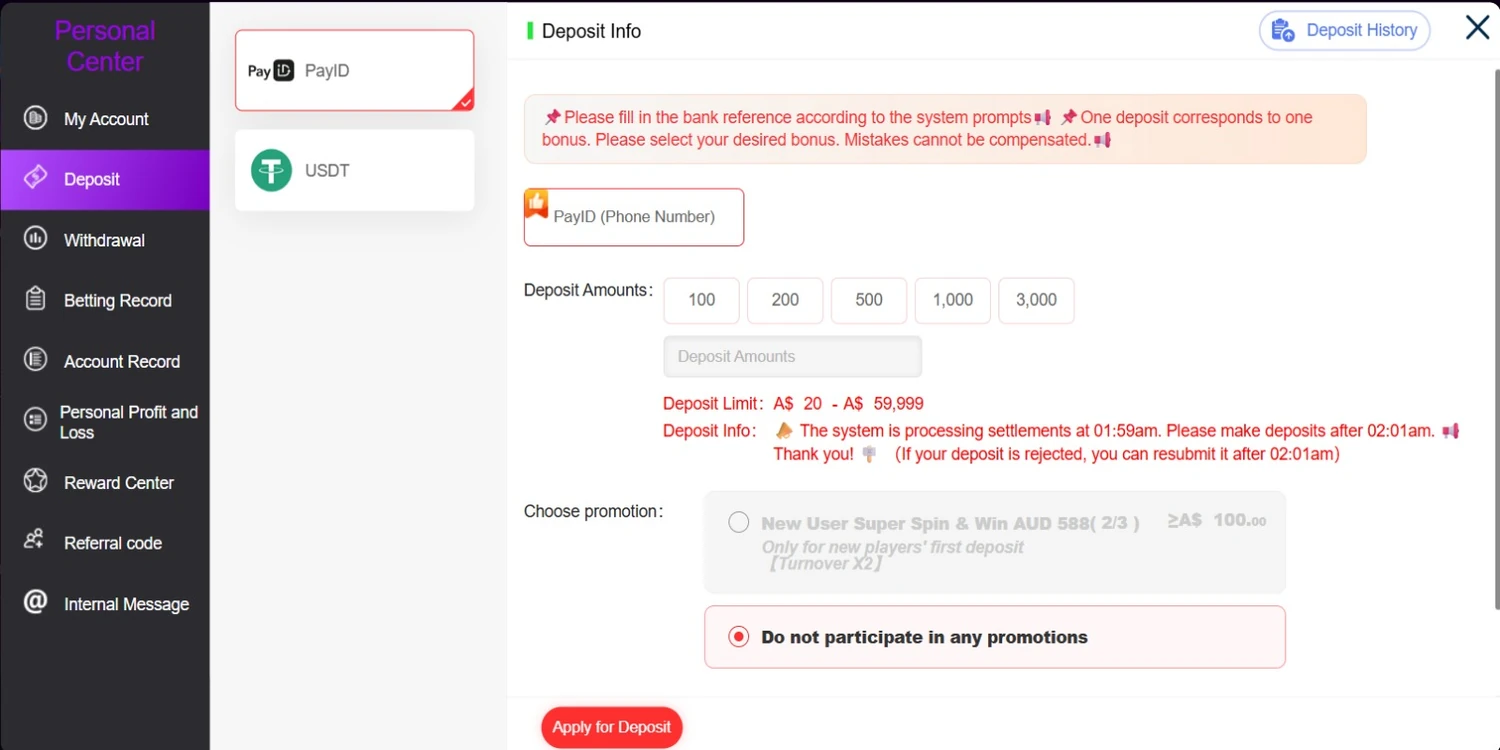
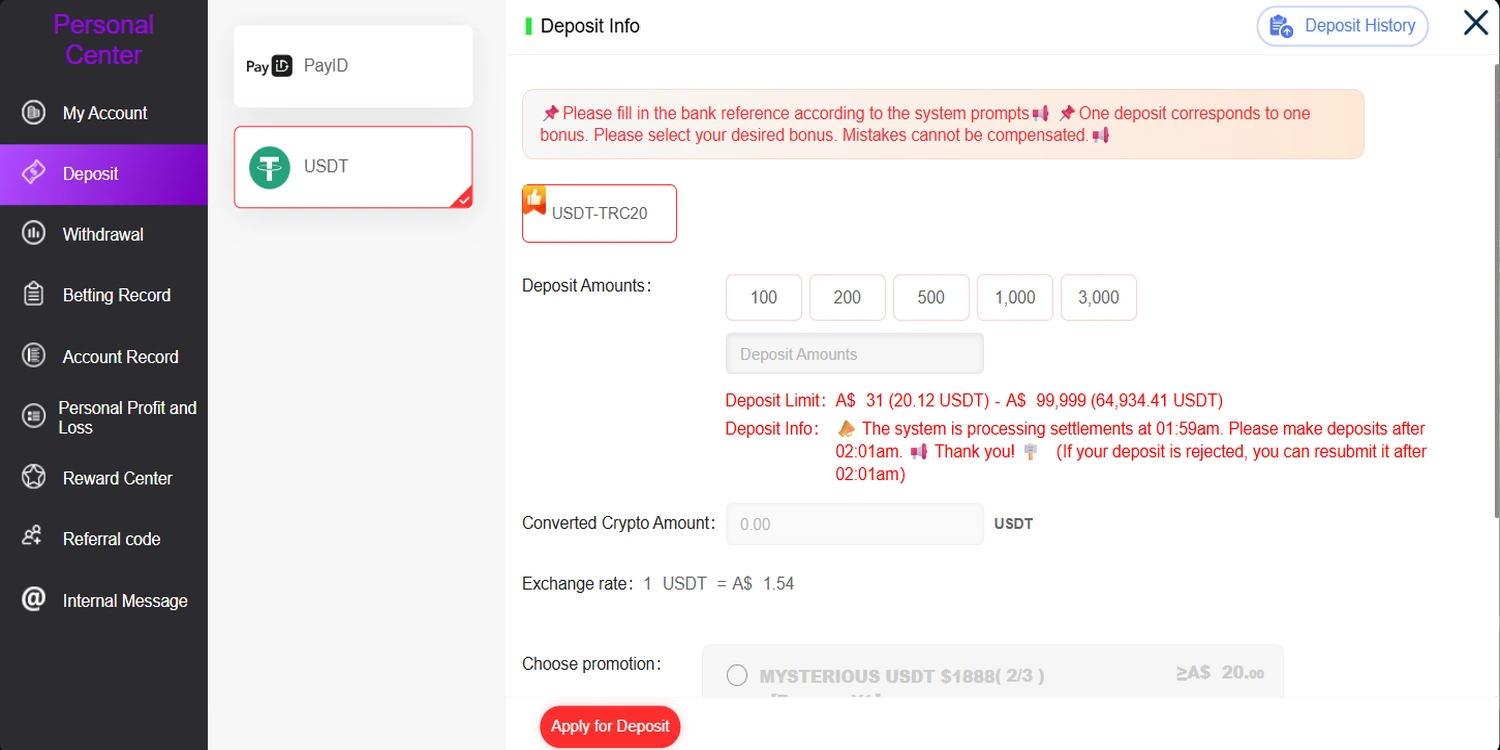
Account identifiers, balances, recipient details, bank references and wallet addresses are excluded. The live cashier controls current values.
Cashier Path
Depositing at TokenAud, Step by Step
Eight steps from account entry to confirmation. Here, cashier means the Deposit panel inside the tokenaud.com account area, not a physical cash counter. Steps three to five all happen before submission.
Register or log in
Accounts live on tokenaud.com. New members start with the registration guide; returning members with trouble signing in use login help.
Open Personal Center → Deposit
The Deposit Info panel opens with the route tabs on the left and the amount, promotion and submission controls on the right.
Select PayID or USDT
The tab you pick sets the floor and ceiling for the next step: A$20–A$59,999 on PayID (Email), AUD 31–A$99,999 on USDT-TRC20.
Choose a preset or type an amount
Five presets from A$100 to A$3,000, or any figure inside the displayed range. On USDT the Converted Crypto Amount updates alongside it.
Choose the promotion, or decline it
Pick the offer you intend to claim, or select "Do not participate in any promotions". Current offer values sit on the promotions page.
Select Apply for Deposit
This submits the request with the route, amount and promotion you selected. The combination is fixed at this point.
Follow the live system prompts
The platform generates the transfer instructions for your request, including the bank reference on PayID. Use those live values, never a figure copied from elsewhere.
Check Deposit History
Confirm the record in the panel. If it remains unresolved, contact TokenAud deposit support with the time, amount and route.
Three Different Numbers
Payment Minimum Is Not the Promotion Minimum
Three separate thresholds control different stages of the deposit and bonus journey. Clearing the payment route minimum does not automatically clear the promotion minimum or its rollover requirement.
1 · Payment route minimum
The smallest amount the channel will accept: A$20 on PayID (Email), AUD 31 on USDT-TRC20. Below it the request cannot be submitted at all. It says nothing about any offer.
2 · Promotion qualifying minimum
The amount a specific offer requires before it becomes claimable. It is set per offer and is frequently higher than the route floor. Current figures live on the promotions page.
3 · Rollover requirement
An entirely separate condition that applies after a bonus is credited, governing when a promotional balance can be withdrawn. Binding definitions are in TokenAud bonus terms.
How the gap shows up in practice. An A$20 PayID deposit clears the route floor and meets the published deposit-amount field for TokenAud Daily Boost 20%; all remaining eligibility rules still apply. The same A$20 is below the published qualifying deposit for Welcome Bonus Slot Game 50%, which starts at A$50, and Welcome Bonus Slot Game 100%, which starts at A$100. Meeting the channel minimum never grants an offer by itself — the qualifying amount and every other condition for the selected offer must be met. Check the current figures on the promotions page before choosing an amount.
Timing
Choose the Promotion Before You Submit
One deposit corresponds to one bonus. Select the bonus you want before submitting — the platform states that a selection mistake cannot be compensated.
The promotion selector sits directly below the amount field on both routes. It lists the offers currently available for that deposit and includes "Do not participate in any promotions" when no promotion should be attached to that transaction. Once Apply for Deposit is used, the route, amount and promotion choice are submitted together — the platform states that selection mistakes cannot be compensated.
Deciding before you open the cashier
The selector is not the place to compare offers — it shows names and a qualifying figure, not the full conditions. Decide on the promotions page which offer you are funding for, note its qualifying deposit, then open the cashier with a number already chosen.
Where the binding rules live
Eligibility, rollover basis, eligible games, claim frequency, expiry and any offer withdrawal cap are held in TokenAud bonus terms. That page also covers what happens when a condition is not met inside an offer's time frame.
Route chosen, amount set, promotion selected — the deposit itself is submitted in the account cashier on tokenaud.com.
Open TokenAud.com Deposit PlatformSettlement Notice
The 01:59 AM Settlement Window
The cashier displays one specific timing notice. It is a short nightly processing interval, not a general statement about how long any deposit takes.
The platform notice states the system is processing settlements at this time.
The notice asks members to make deposits after this point.
The notice states a rejected deposit can be resubmitted after 02:01 AM.
What this notice does not say. It is a platform-displayed settlement message about a two-minute nightly interval. It is not a processing-time commitment, a crediting speed, a service-level promise or a statement that deposits outside that window behave in any particular way. TokenAud publishes no fixed deposit processing time and no deposit fee schedule, so this page states neither.
Diagnostics
Deposit Not Going Through? Work Down This List
Ten checks in the order they usually apply. Each one names the specific next action rather than sending you back to the panel to guess.
The amount is below the route minimum
Next step: raise the figure to at least A$20 on PayID (Email) or AUD 31 on USDT-TRC20, or switch to the route whose floor suits your amount.
The amount is above the displayed maximum
Next step: bring the figure inside the range on the panel — up to A$59,999 on PayID or A$99,999 on USDT. If the intended amount exceeds the displayed ceiling, contact TokenAud support before submitting rather than attempting an unconfirmed workaround.
A phone identifier was used on the PayID deposit
Next step: the deposit route on the panel is PayID (Email). Use the email-addressed route the cashier displays; the phone identifier belongs to the withdrawal side documented on withdrawal rules.
The bank reference was not copied exactly
Next step: reopen the request and copy the reference exactly as the current system prompt generates it. Do not reuse a reference from an earlier deposit or another source.
The attempt fell inside the settlement interval
Next step: wait until after 02:01 AM and submit again. The platform notice states a deposit rejected during that interval can be resubmitted after that time.
The crypto network did not match the route
Next step: the confirmed route is USDT-TRC20. Confirm the network shown in the cashier before sending, and never assume another network is interchangeable with it.
The converted USDT amount changed
Next step: that is the live rate moving between when you looked and when you submitted. Read the Converted Crypto Amount on the panel at the moment of the request rather than reusing an earlier figure.
A promotion was wanted but not selected before submission
Next step: the platform states that selection mistakes cannot be compensated. Check bonus terms, then make the intended selection before submitting any future qualifying deposit.
The request was submitted but not checked
Next step: open Deposit History at the top of the Deposit panel. That record is the first evidence of what was submitted and under which route.
The record is still unresolved
Next step: contact TokenAud deposit support with the time, amount, route and a screenshot of the Deposit History entry. Never send a password, a one-time code or full card details to anyone.
Two Different Panels
How Deposits Differ From Withdrawals
PayID appears on both sides of the account, which is exactly why the two get confused. They are configured separately and follow different rules.
Deposits — this page
PayID (Email) from A$20 and USDT-TRC20 from AUD 31, with amount presets, promotion selection and the Apply for Deposit action, all inside Personal Center → Deposit.
Withdrawals — a separate owner page
A different panel with its own routes: PayID by email or phone number, bank account and crypto wallet. The bank list, registered withdrawal accounts, processing conditions and the A$50 minimum all belong there.
A$50 is the withdrawal minimum, not a deposit minimum. It has no bearing on what you can fund with. The deposit floors are A$20 and AUD 31. Full cashout routes and conditions are documented on TokenAud withdrawal rules.
Funding and Offers
What a Deposit Route Does and Does Not Tell You About an Offer
A payment method describes how money reaches the account. It says nothing about whether a particular reward requires funding first. The two questions are independent: a platform can support a low-floor deposit route and still attach every reward to a qualifying deposit, and the presence of PayID or USDT on the cashier is not evidence about any offer's category.
Whether a reward counts as genuinely free of a funding requirement is decided by the offer sheet, not by the payment panel. That classification — and how it compares with deposit-linked, App-based and turnover-based formats — is covered in the online pokies no deposit bonus guide. Current offer values remain on the promotions page, and the conditions that bind them on bonus terms.
Evidence
How These Payment Facts Were Checked
- Page owner
- TokenAud.org, the official TokenAud brand website for Australia. This is a first-party payment information page, not an independent review or comparison site.
- Source basis
- The route labels, amount ranges, preset amounts, settlement notice, promotion selector and submission action on this page were read directly from the TokenAud.com Deposit Info panel.
- Last reviewed
- What is not claimed
- No completed deposit test is claimed. TokenAud publishes no fixed processing time, no deposit fee schedule and no permanent exchange rate, so none is stated here. Recipient details, bank references and wallet addresses are generated live per request and are never reproduced on this site.
- Where values are controlled
- The live cashier governs. Ranges, presets, available promotions and the displayed rate can change between reviews — if a figure here differs from the panel, the panel applies. Report the difference to TokenAud support so this page can be corrected.
FAQ
TokenAud Deposit Questions
What payment methods does TokenAud accept for deposits?
Two confirmed routes: PayID (Email) and USDT-TRC20. Both are selected as tabs inside Personal Center → Deposit on tokenaud.com, and both begin with an AUD amount.
What is the TokenAud PayID minimum deposit?
A$20, with a platform-displayed maximum of A$59,999. Preset amounts of A$100, A$200, A$500, A$1,000 and A$3,000 are offered, and any figure inside the range can be typed instead.
Is the TokenAud PayID deposit route email or phone?
The deposit route displayed in the cashier is PayID (Email). The phone identifier belongs to the withdrawal side, which is a separate panel documented on withdrawal rules.
What is the USDT minimum and displayed maximum?
AUD 31 minimum and a platform-displayed maximum of A$99,999. You enter an AUD figure and the cashier shows the Converted Crypto Amount in USDT.
Which USDT network is confirmed?
TRC20 — the route is labelled USDT-TRC20 and no other network appears on the confirmed deposit panel. Confirm the network shown in the cashier before sending.
Why does the converted USDT amount change?
Because the cashier applies a live exchange rate that moves with the market. The same AUD figure will not always convert to the same USDT amount, which is why no rate is published on this page.
What are the preset deposit amounts?
A$100, A$200, A$500, A$1,000 and A$3,000 on both routes, alongside a free-entry field for any amount inside that route's displayed range.
When should a deposit rejected in the settlement window be resubmitted?
After 02:01 AM. The platform notice states settlements are processed at 01:59 AM, asks members to deposit after 02:01 AM, and says a rejected deposit can be resubmitted after that time.
Can a promotion be added after the deposit?
No. One deposit corresponds to one bonus and the selection is made before submission; the platform states a selection mistake cannot be compensated. Selection rules are in bonus terms.
Is the payment minimum the same as the promotion minimum?
No. A$20 on PayID is the channel floor. Each offer sets its own qualifying deposit, which is often higher — current figures are on the promotions page.
Where can I check deposit history or get help with an unresolved deposit?
Deposit History sits at the top of the Deposit panel on tokenaud.com. If a record stays unresolved, contact TokenAud deposit support. Broader account questions are answered in the TokenAud FAQ.
Official Route
Where Deposits Actually Happen
tokenaud.org — official TokenAud brand website
The page you are reading. It publishes route labels, amounts, cashier steps and diagnostics. It never asks for a login, a deposit amount, a PayID identifier, a wallet address, a one-time code or an identity document.
tokenaud.com — account and transaction platform
Registration, login, the Deposit panel, promotion selection, Deposit History and gameplay. Every deposit button on this page opens this domain and nothing else.
Responsible Gambling
Set the amount before you open the cashier
TokenAud is for players aged 18 and over. Gambling involves financial risk and losses are possible. Deposit presets are convenience buttons, not recommendations — decide your own figure and your own limit first, and treat any promotion as a second question. Support options and self-management tools are on the responsible gambling page.
Ready to Fund Your TokenAud Account?
Pick the route that fits your amount, decide the promotion before you submit, and complete the deposit in the account cashier.
Deposits are submitted on tokenaud.com at Personal Center → Deposit after you log in.
Payment facts last reviewed on .